
Creating a Test Plan - FCC 5GNR
The FCC 5GNR option is used for FCC / IC (ISED) certification testing of 5G NR Sub-6GHz terminal products. When creating a test plan, select the Type (network mode) first: Sub 6G SA / Sub 6G NSA / RedCap, described separately below.
Sub 6G SA / RedCap
The form for RedCap (Reduced Capability) is identical to Sub 6G SA and is not described separately.
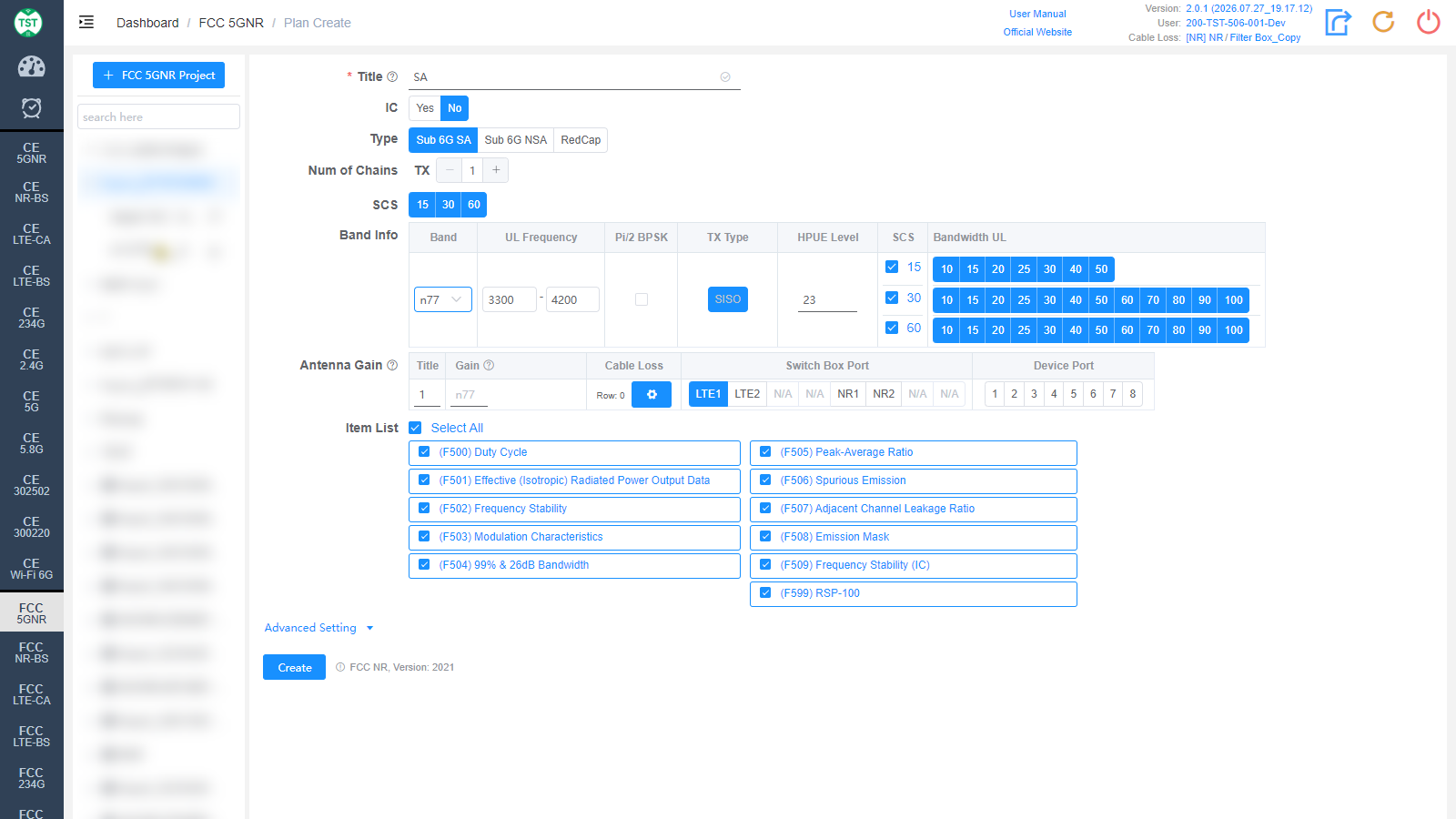
Title: Test plan name, entered by the user, e.g., SA / n41 / NR-Ant1.
IC: Whether to test according to Canadian IC (ISED) requirements as well, default No. When Yes, IC-related items (e.g., F599 RSP-100) are included.
Type: Network mode:
Sub 6G SA: 5G NR Standalone.
Sub 6G NSA: 5G NR Non-Standalone (EN-DC dual connectivity).
RedCap: 5G RedCap (Reduced Capability) device.
Num of Chains: Number of transmit chains (TX).
SCS: Subcarrier spacings (kHz) supported by the product, multi-select: 15 / 30 / 60, all selected by default.
Band Info: NR bands supported by the product, one band per row:
Band: NR band number, e.g., n41 / n77 / n78. The uplink frequency is filled in automatically after selection.
UL Frequency: Uplink frequency range (MHz), auto-filled and editable.
Pi/2 BPSK: Check if the product supports Pi/2 BPSK modulation.
TX Type: Transmission type SISO.
HPUE Level: High Power UE power class (dBm), default 23.
SCS / Bandwidth UL: One row of uplink bandwidth (MHz) options per SCS. Available options vary with band and SCS; select according to the product's actual support.
Antenna Gain: Antenna gain and cable loss configuration. Besides numeric ports, the Switch Box Port can be set to dedicated ports such as LTE1 / LTE2 / NR1 / NR2; Device Port specifies the instrument port:
Title: Antenna number.
Gain: Gain (dBi) of each antenna in the corresponding band.
Cable Loss: Cable loss from the product's antenna port to the Switch Box or spectrum analyzer. How to Create Common Cable Loss.
Item List: Test items included in FCC NR, all selected by default:
(F500) Duty Cycle
(F501) Effective (Isotropic) Radiated Power Output Data
(F502) Frequency Stability
(F503) Modulation Characteristics
(F504) 99% & 26dB Bandwidth
(F505) Peak-Average Ratio
(F506) Spurious Emission
(F507) Adjacent Channel Leakage Ratio
(F508) Emission Mask
(F509) Frequency Stability (IC, Canada)
(F599) RSP-100 — Canadian RSP-100 certification form
Note: In some standards, test parameters are mutually referenced between items; it is recommended to create the test plan with the default items.
UE Control: Whether the software automatically controls the sample, default OFF. When OFF, the sample state must be controlled manually during the test.
UE Connect: UE connection waiting time (seconds), default 60. The timeout for the UE to connect to the base station emulator or to start up.
Sub 6G NSA
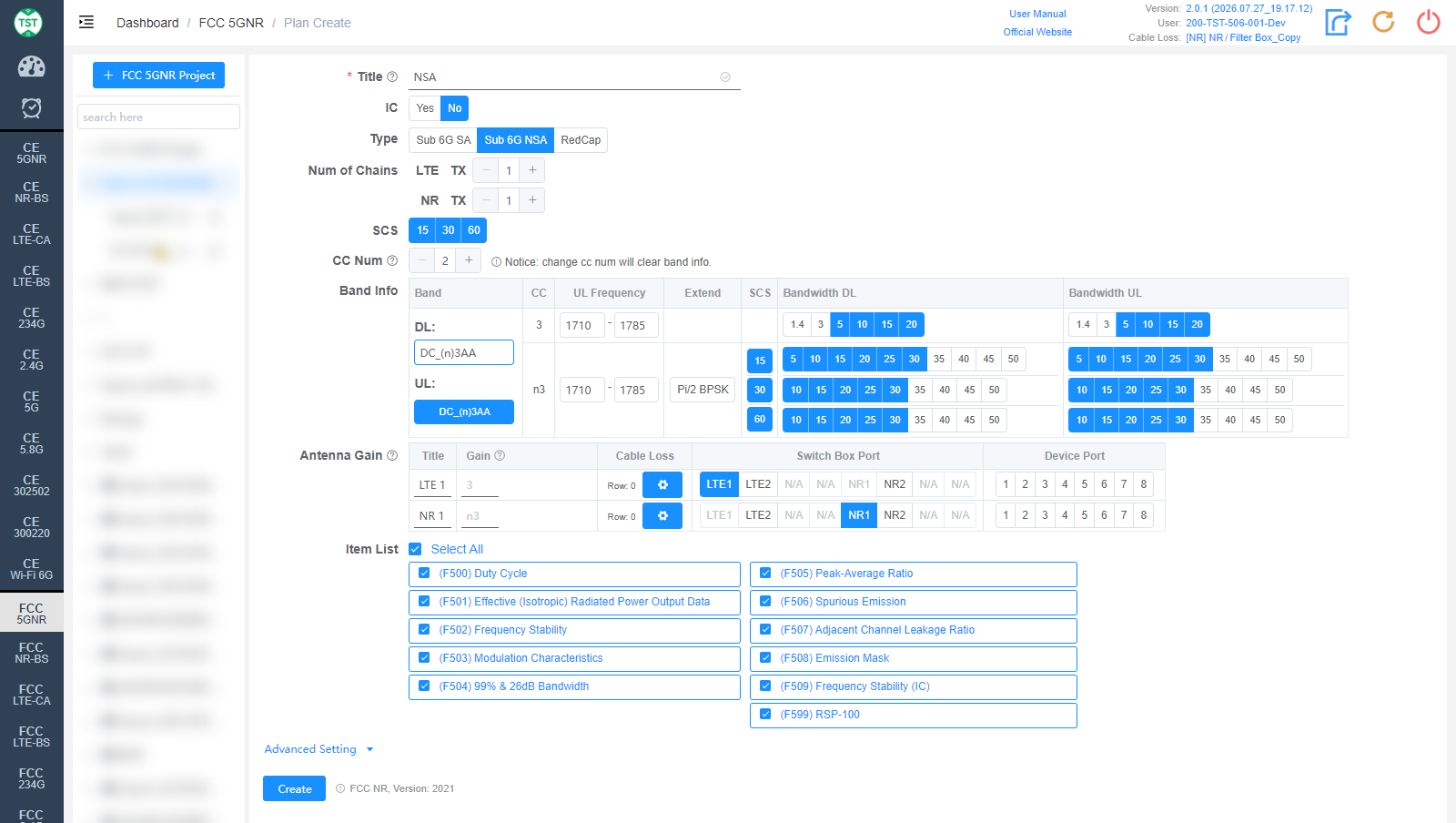
In NSA (EN-DC) mode, the following fields differ from SA:
Num of Chains: Set the LTE TX and NR TX chain numbers separately.
CC Num: Number of carriers. Note: changing CC Num will clear the Band Info.
Band Info: Select the EN-DC band combination (e.g., DC_(n)3AA / DC_(n)5AA / DC_(n)41AA). The table then lists the DL (LTE anchor) and UL (NR) rows:
CC: Band of each component carrier.
UL Frequency: Uplink frequency range (MHz).
Extend: Extended configuration (e.g., Pi/2 BPSK).
SCS / Bandwidth DL / Bandwidth UL: Bandwidth selections per SCS.
Antenna Gain: LTE and NR antennas are configured separately (row titles LTE 1 / NR 1, etc.); Switch Box Port selects the corresponding LTE1 / NR1 ports.
The other fields (Item List / UE Control / UE Connect, etc.) are the same as SA.
Advanced Setting
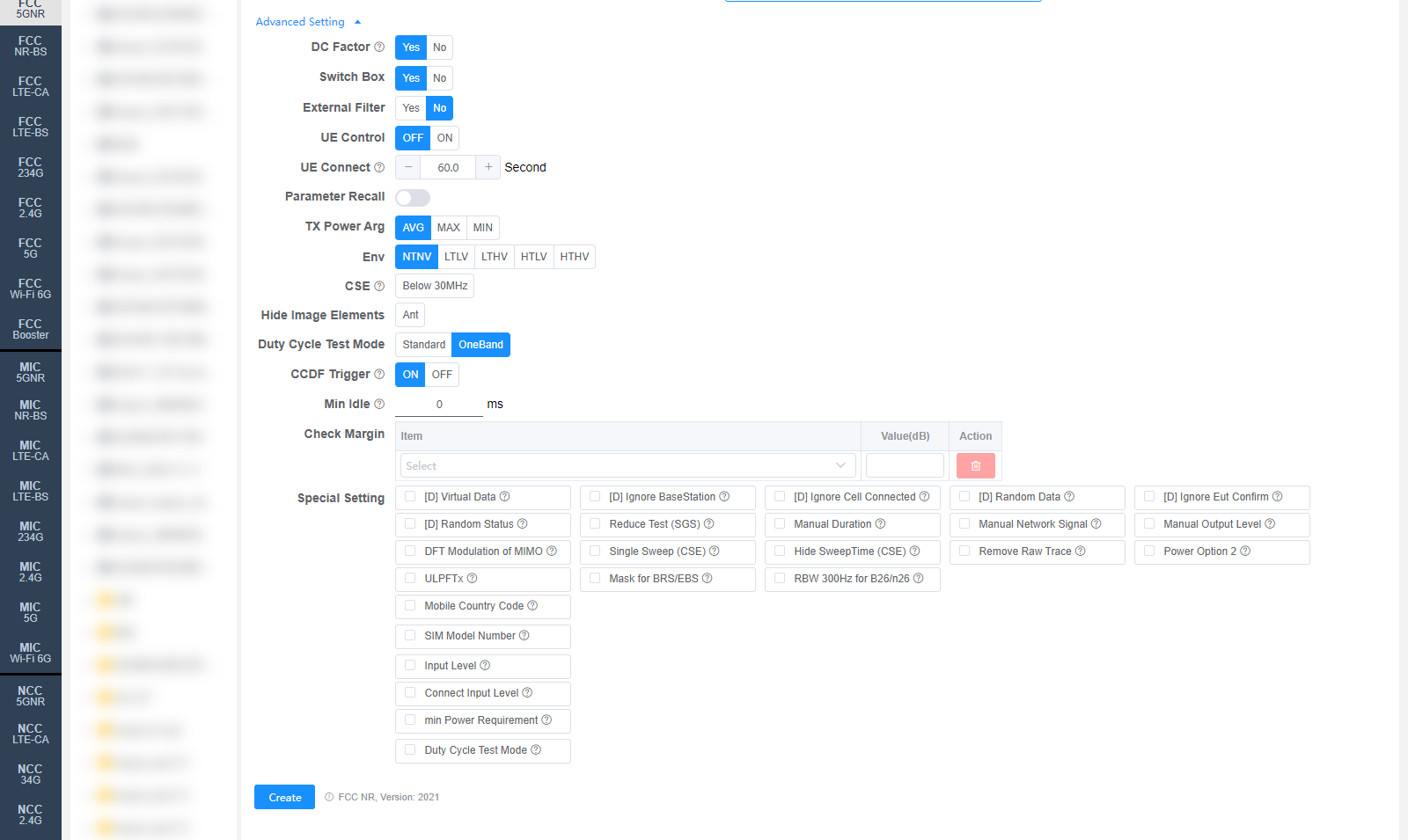
All settings in Advanced Setting can generally be kept at their default values. Adjust them only when the test results are abnormal or there are special test requirements.
DC Factor: Whether to enable duty cycle factor correction, default Yes. For spurious emission tests.
Switch Box: Whether to use a Switch Box (RF switch), default Yes.
External Filter: Whether an external filter is used in the RF path, default No.
Parameter Recall: Whether to recall a parameter configuration file stored in the base station emulator. If needed, enter the file path and name.
TX Power Arg: TX power evaluation method: AVG / MAX / MIN.
Env: Environmental conditions, multi-select: NTNV / LTLV / LTHV / HTLV / HTHV.
CSE: Conducted Spurious Emissions setting. Below 30MHz additionally tests 9 kHz ~ 150 kHz / 150 kHz ~ 10 MHz / 10 MHz ~ 30 MHz. The default value can be changed on the Setting page.
Hide Image Elements: Elements to hide in report images (e.g., the Ant marker).
Duty Cycle Test Mode: Standard / OneBand. OneBand: a mode only measures one duty cycle.
CCDF Trigger: CCDF trigger mode, default ON. If an R&S signal and spectrum analyzer is used, please ensure proper wiring; the default value can be changed on the Setting page.
Min Idle: Minimum idle time (ms) for the duty cycle test, default 0.
Check Margin: Test margin check. Select an Item and fill in Value(dB); results with a margin smaller than the set value will be flagged.
Special Setting: Special settings. Options prefixed with [D] are debug options:
[D] Virtual Data / [D] Ignore BaseStation / [D] Ignore Cell Connected / [D] Random Data / [D] Ignore Eut Confirm / [D] Random Status: Debug options.
Reduce Test (SGS): Reduced testing (SGS Lite V1).
Manual Duration: Set the Duration manually; the system will not set it for MT8000.
Manual Network Signal: Set the Network Signal manually.
Manual Output Level: Set the Output Level manually.
DFT Modulation of MIMO: Test DFT modulation for MIMO (FCC/MIC 5G NR MIMO).
Single Sweep (CSE): CSE uses single sweep. Requires a retest to take effect (ReTest).
Hide SweepTime (CSE): Hide the CSE sweep time. Requires a recalculation to take effect (ReCalc).
Remove Raw Trace: For F506, remove the raw trace and hide RBW/VBW.
Power Option 2: Use Option 2 for CBSD band power tests.
Referenced regulation (displayed next to the Create button): FCC NR, Version: 2021